
TikTok can wait
until they're home.
You set a routine for your child's iPhone. Social, games and video wait during school hours. Everything they actually need stays available — all day, no exceptions.

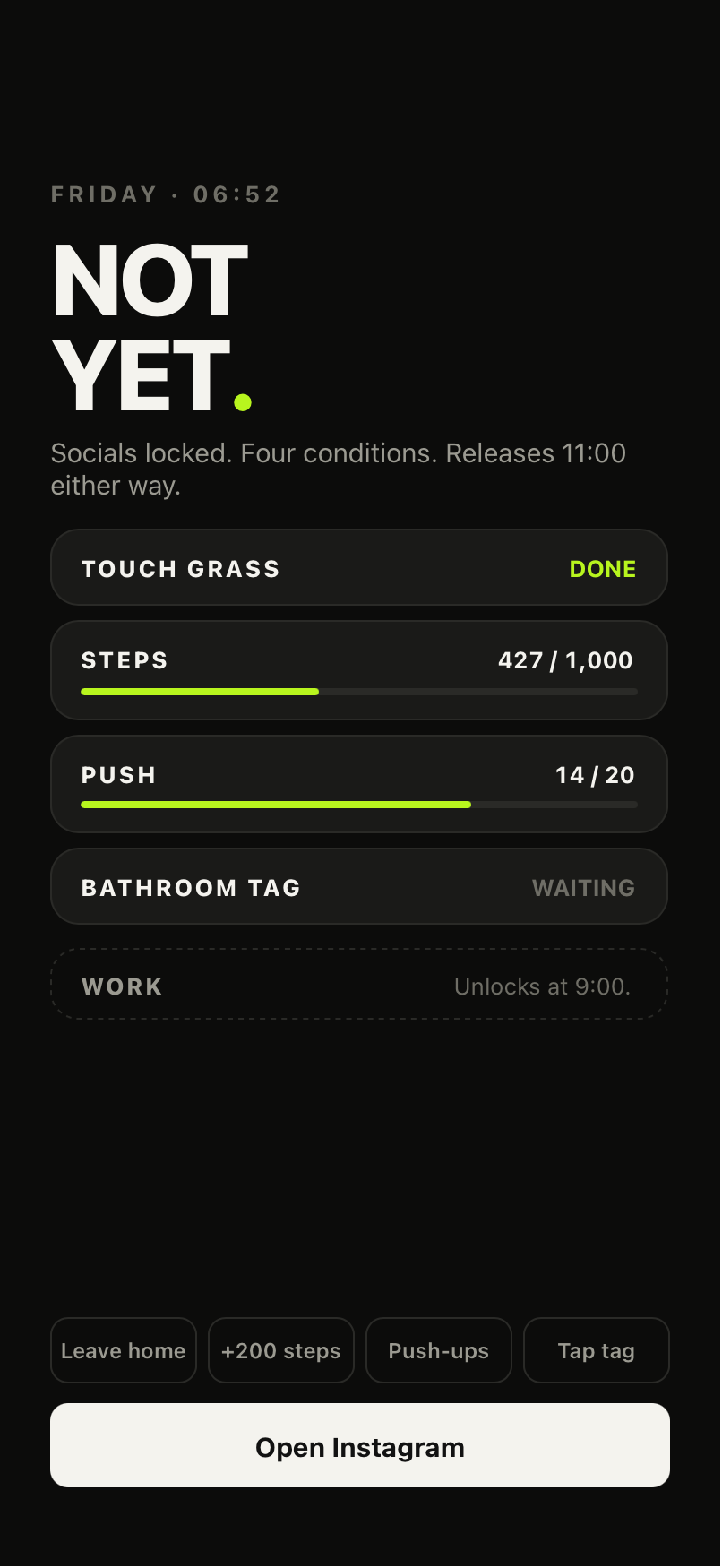
Plain, and never a lecture.
The adult app shown here; the child version says the same things more warmly, always leading with what they still have. Their own routines and progress stay private; child accounts are not placed on public leaderboards. What changes is the tone: no roasts, no shaming, and never a nudge that makes a rest day feel like a failure.
The parent sets it.
The child lives it.
The parent chooses what waits, through Apple’s own picker, and a child cannot change that selection or lift it themselves — they can only ask. School Day is just the scheduled version — a parent can also start a focus window any evening or holiday morning. What a child can do is finish any of them four different ways: the clock runs out, they get home, they confirm the task, or they tap the tag. During setup, the adult chooses essential apps through Apple’s picker and approves the selection. Check calling, messaging and navigation on the child’s iPhone before relying on a routine; a saved choice does not confirm that an app is working.
Which is why a child has no override button. A routine keeps its original timer and the completion methods the parent allowed. Emergency help does not depend on requesting an early social-app unlock.
from the app design · Ava is the example child in the build
Told what happened. Never what they opened.
The parent’s Family home shows whether School Day ran, when Ava confirms a task, and any request she has made. That is the whole feed. Not her messages, not her location, not which apps she opened — and there is no photo proof of homework, because handling images a child has taken is a risk we will not put on a family or on ourselves.
She asks. You answer in one tap.
A request arrives as a plain sentence with the time it was sent and the context. Approve it for an hour, a night or tomorrow — or decline. Either answer sends a plain message with no lecture attached, and declining is not a punishment.
School hours, and a hard backstop.
From and until, matched to the real school day. Term time only, so it switches itself off in holidays, half terms, INSET days and bank holidays. Then the part parents ask about most: there are four ways the apps come back, all live from launch. The school day simply ending. Getting home, confirmed on their own phone. Marking a task done. Or a tap on a family tag. Pick one, or several — and whichever you choose, 15:15 is a hard backstop that ends the window by itself.
Not only the school day.
Homework on a Tuesday evening. Dinner. A morning in the holidays when everyone is at home and nobody should be on a phone. A parent can start a window there and then — one, two or three hours — or set it to repeat on the days that need it.
Holiday windows deliberately ignore term dates, so they still run when School Day is switched off. The child is told what is resting and when it returns, and they can end a homework window early by confirming the work is done — the same immediate release as any other rule. The adult also chooses essential apps to keep available and checks those choices on the child’s iPhone.
What stays available, chosen together.
The child’s screen shows the apps chosen to stay available, followed by what is resting. The choices shown here are an example; a parent approves their own selection and checks it on the child’s iPhone. Kind words, no countdown pressure. She can mark the task done and her apps return immediately: a parent is never a gate she is stuck behind because they are asleep, driving or at work.
A child cannot be sent an adult line.
Adults, teens and children each have their own choice of voices. A child receives kind language, and a parent cannot turn on an adult tone for them. Adult messages and audio are cleared before a child uses the app; Brutal always requires an adult to choose it.
Family is gated behind parent authentication, and material changes require re-authentication — a child knowing the passcode is never enough.
Not on my phone.
Out here living.
Children can see their own progress without competing for a school or city ranking. Their routines are for them; schools cannot see or rank an individual child’s progress.
This is the part we actually built the product for. A phone habit formed at eleven is not a decision anyone made — it is a pattern laid down before there was any choice in it, by apps engineered to be difficult to put down. An adult trying to break that is unpicking fifteen years of practice.
A child doing this is not unpicking anything. They are simply learning the order of things early — move first, go outside first, do the thing first, and the phone comes after. Not as a punishment they endure, but as the shape a morning has always had for them. That is a far easier thing to give a child than to give an adult, and it is why the child version leads with what they still have rather than what is locked.
We are not claiming a medical or educational outcome, and we would be wary of anyone who did. This is why the product is shaped the way it is — not a promise about what it will do to your child.
Children’s progress stays private. Public child rankings and public child awards are not part of this launch. A school cannot use the partner reports to identify or rank an individual child.
private progress · no public child rankings
One plan, the whole house.
The whole Family layer, month to month. Cancel whenever it stops being useful.
See all plansAbout £20.83 a month — £49.89 less a year than paying monthly.
See all plansTwo adults and up to four children. Family access for as long as NOT YET exists; child seats end at 18.
Charges immediately. No trial or renewal.
See Lifetime details →· linked child devices and profiles
· rules and schedules per child
· School Day on every child account
· children get the full app for themselves too
· eligible seven-day trial on subscriptions · cancel anytime
Family is the only plan with parent controls and linked child devices. An Individual subscription covers one person managing their own mornings — it does not include the Family layer.
Family monthly and annual subscriptions have a seven-day trial for eligible customers, then renew at £24.99/month or £249.99/year unless cancelled in time. Separate Founding Family Lifetime is £299.99 once for two adults and up to four child seats until age 18, limited to 2,500 places. It charges immediately without a trial and lasts for as long as NOT YET exists. Refunded purchases release places. Individual Lifetime is a separate one-adult purchase. Prices shown are UK; the App Store charges the price set for your territory in your local currency, and the price shown at purchase governs.
Essential app choices.
Choose the apps your child needs for calling, messaging and getting home during Family setup. A household adult reviews the selection on the child’s iPhone and approves it from their own device. Check that the selected apps work before starting a routine.
We do not offer block-everything. NOT YET keeps approved app choices outside its Family restrictions. Other iPhone settings can also affect access; approval alone is not proof that an app is available. Emergency SOS remains a separate iPhone feature.
Through Apple Family Sharing and a Child Account — not a checkbox. Each step says which phone it runs on.
Apple's own picker, so even we never learn the app names.
Weekday times, term dates, half terms, inset days, clubs. Plus the earliest time home counts — tapping the tag on the way out at eight does nothing.
Primary home, a second parent's home, a grandparent or carer, and an accessibility alternative. Any tag can be revoked instantly.
What is recorded
This is the version of that record in plain English. Your own copy is stamped with the version above and the date and time you agreed to it, and it sits in Settings → Family → Consent record alongside every change since — each one logged, each one exportable, each one withdrawable. If we ever change what is recorded, the version number changes, you are told, and the old version stays readable so you can see exactly what moved. The full policy is here if you want it, but you should not need it to answer this question.
No roasts. No shaming.
No one watching.
The child version of NOT YET speaks differently: plainer, shorter, warmer. It always says what they still have before it mentions what waits. When they have earned time, they can see how much of it is left; that is theirs to know. What it will not do is count down at them, praise them for obedience, or roast a child for a bad morning — the sharper tones an adult can choose are not available on a child’s account, and a parent cannot switch them on.
It never tells a child they are addicted, has failed, is lazy, has disappointed anyone, is being punished or is being watched. The SASSY and BRUTAL voices adults can choose do not exist on a child profile — not as a setting, not as a fallback, not at all.
When they get home they tap the tag. Apps come back. That's the whole interaction.
What you can do. And what a school can't
You can: end or pause today, approve an early unlock, change future schedules, manage apps and tags, add another guardian, mark them absent, run several children separately, and delete the profile and its data. Material changes need your authentication — a child knowing the passcode is not enough.
A school cannot: enrol anyone, create restrictions, choose apps, change a schedule, or see their app selections, usage, location, tag scans, your decisions or any override. Schools promote; they never monitor. This is not attendance tracking and will never be positioned as such.
The safety floor
An already-active Family restriction continues offline with its original timer, permitted completion methods and emergency access. A request that needs a parent’s reply stays pending while they are unreachable. Losing the network does not end the restriction. Children can submit a deletion request for privacy-team review; submitting one does not immediately lift restrictions, and parents have no automatic veto.
This is a strong parent-managed boundary. It is not impossible to bypass, and we will not tell you otherwise.
School Day lands in January 2027.
Family and School Day are a separate release after the individual launch, coming January 2027. Release depends on completing the child privacy assessment, verifying Apple configuration and testing parental consent and restrictions on real devices.
A separate independent safeguarding review comes before we work with any school or trust. It is not a condition of releasing Family to parents, and we are not going to pretend otherwise to sound more careful than we are.
2,500 Founding Family memberships. £299.99 once, for as long as NOT YET exists. Two adults and up to four children — six people, one payment, never again. Work out what six seats cost anywhere else and you will see why we do not expect these to last.
Family Lifetime can be bought directly for £299.99 once Family arrives in January 2027. Alternatively, buy Individual Lifetime and choose Family at purchase. That purchase holds a Founding Family place. When child accounts ship in January 2027, eligible holders can upgrade in the app for £250 after their account’s paid Family hold is verified. If you decide against Family, you keep Individual Lifetime. Refunding Individual Lifetime releases its Family hold.
Founding Family is capped at 2,500 places. Direct Family monthly and annual memberships are coming January 2027. This page does not reserve a place or take payment.
Paid holds and Family purchases share this limit. Refunded purchases do not count. Counts are rounded down; final availability is checked in the app.